
ssh binary, and there is no compatibility mode that does.
That is what makes the rest possible: credentials in the OS keychain,
SFTP in a side panel, port forwards
you can add mid-session, and authentication prompts drawn as sheets in the pane
instead of a password echoing into your shell.
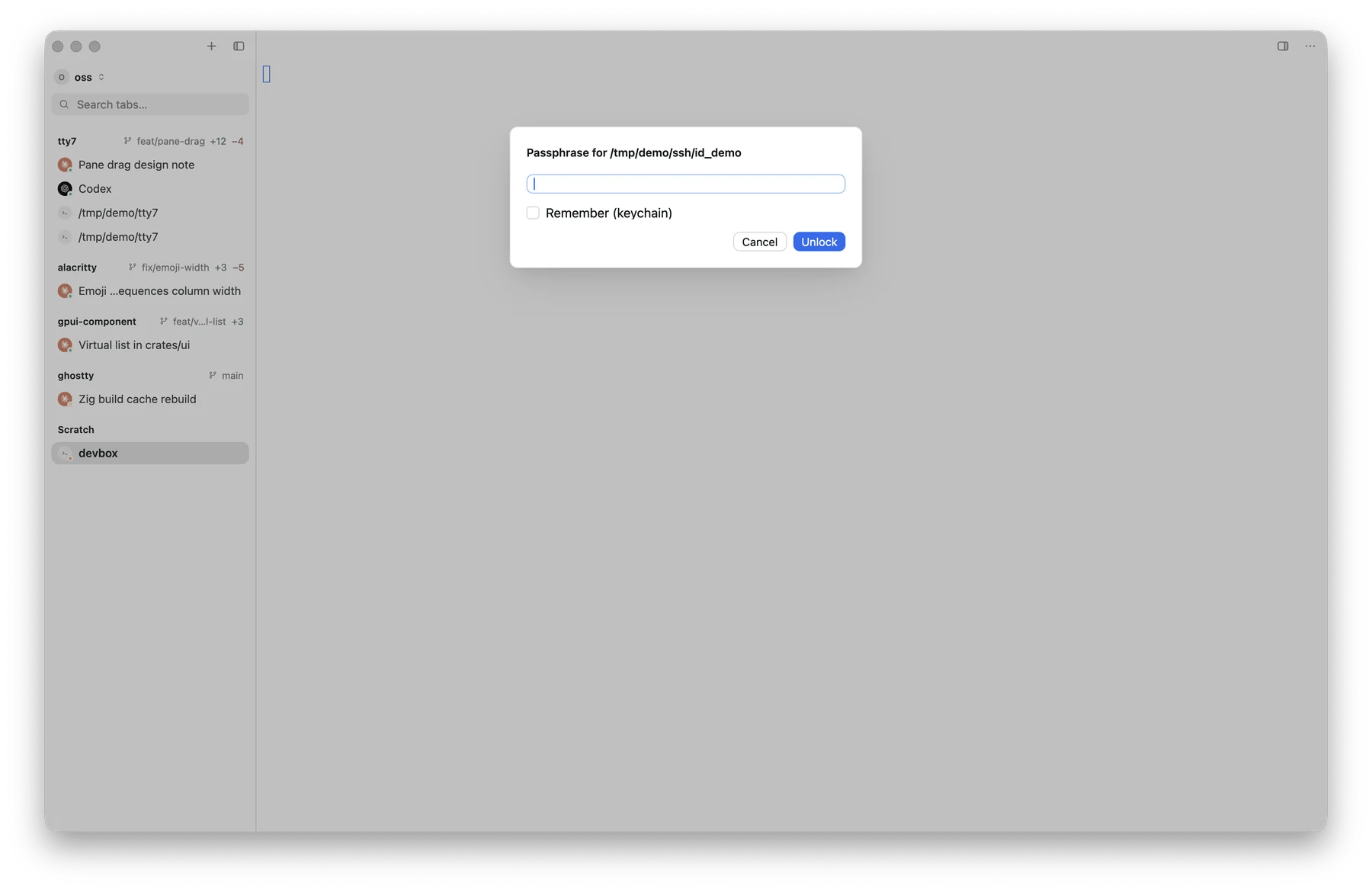
A key passphrase asked for as a sheet inside the pane, with the option to keep it in the keychain
Four ways to connect
QuickConnect — type an address
QuickConnect — type an address
Open Search Everywhere (⌘ P) and type an address. IPv6 works with
brackets.
A saved profile
A saved profile
Profiles live in Settings → SSH → Hosts. Start typing the name in
Search Everywhere’s Hosts tab, or open the SSH: Manage Profiles… command.
An alias from ~/.ssh/config
An alias from ~/.ssh/config
Type an alias you already have and tty7 resolves it natively — common fields,
best effort — then connects over russh. Settings → SSH → Import from
~/.ssh/config turns aliases into real profiles.
Match, canonicalize*, and GSSAPI directives are not supported, and
there is no fallback to the system ssh when one appears.A remote workspace
A remote workspace
The same connection can host whole workspaces on the far machine rather than
a single shell. Remote workspaces →
Profiles
Settings → SSH → Hosts holds the full connection config. The basics:
Defaults at the top of the list is inherited by every host, so a setting you
want everywhere is set once.
Right-clicking an SSH tab opens that connection’s host form — Edit Host…
for a saved one, Save as SSH Host… for an address typed by hand. It is the
same row the workspace switcher’s machine menu carries, so a hostname or
password typed wrong is corrected from the tab you noticed it on. The menu acts
on the tab it was opened on, not on whichever pane is focused. Saving one opens
on the whole live connection — its proxy, keys and forwards as well as its
address — so the host that lands is the one you were already on.
Saved hosts are kept in
servers.json, beside config.json rather than in
it, so a config.json you sync between machines does not carry them.
Passwords and key passphrases go in the OS keychain, never in either file
and never on disk in plain text. Forget Password in a
profile’s menu removes the stored one.
Deleting a profile drops its keychain credentials and forgets the remote
workspace entries that connected through it — the confirmation counts them
first. The sessions on the machine itself keep running; what happens to its
entries →
Advanced
Behind Advanced on a profile, grouped:
Everything blank means “the library default”, so you only fill in what you
actually need to override.
Copying a remote image to this machine
Programs on an SSH host can write PNG, JPEG, GIF, or WebP images to the system clipboard on the machine running tty7 with the OSC 5522 clipboard protocol. Enable Advanced → Security → Remote clipboard images for that saved host first. It is off by default because any program that writes terminal output would otherwise be able to replace the clipboard. This Python script can be installed on the remote host astty7-copy-image:
tty7-copy-image screenshot.png. A compliant sender may include an OSC
5522 request id and wait for tty7’s DONE, EPERM, EINVAL, or ENOSYS
response. Clipboard control packets are not retained in scrollback and are not
replayed after reconnecting.
Authentication prompts
Password, key passphrase, and 2FA prompts appear as sheets inside the pane, with a Remember (keychain) option where it makes sense.Host keys
Host keys are verified againstknown_hosts by default. A first connection asks
you to confirm the fingerprint; a changed key is a much louder prompt that
makes you type yes to override, because that is what a changed key deserves.
Settings → SSH → Security → Verify host keys turns verification off
entirely. It is on for a reason.
Also under Security: Warn before closing a live connection, off by default.
Reconnecting
⌘ ⇧ R — or SSH: Reconnect in Search Everywhere — restarts the session in the current pane. Useful after a laptop sleeps or a network changes.What is not supported
- No fallback to the system
sshbinary - No
Matchorcanonicalize*directives from~/.ssh/config - No GSSAPI directives from
~/.ssh/config. Kerberosgssapi-with-micitself is supported — pick GSSAPI in a profile’s Auth field — it is just not something the config-file resolution path reads