
Installing the hooks
Settings → Integrations lists every agent that can report status, with an Install button beside each:
Installing writes into that agent’s own configuration directory. Once installed
the row grows a second Uninstall button beside the first, which itself
becomes Reinstall — or Update, against an Outdated state, when tty7
ships a newer hook.
Crush ships only a
PreToolUse hook today. It is enough to remember the
session for resume, but there is no turn boundary behind it, so a Crush pane
carries no status dot and tty7 wait times out rather than returning.Antigravity has no session-start or permission event, so its pane goes
straight from no dot to working on the first model call, and a pending
permission prompt shows as working rather than amber. Its hooks live in a
tty7 set inside ~/.gemini/config/hooks.json, beside any sets of your own.cursor-agent -p (print mode) sends neither of Cursor’s turn hooks, so a
headless run records its session id — Copy Session ID and resume still
work — but shows no status dot. The interactive cursor-agent shows the
full working → done cycle.The hooks only do anything inside tty7. Running the same agent in another
terminal is unaffected.
The status dot
Every tab chip and sidebar row carries a dot: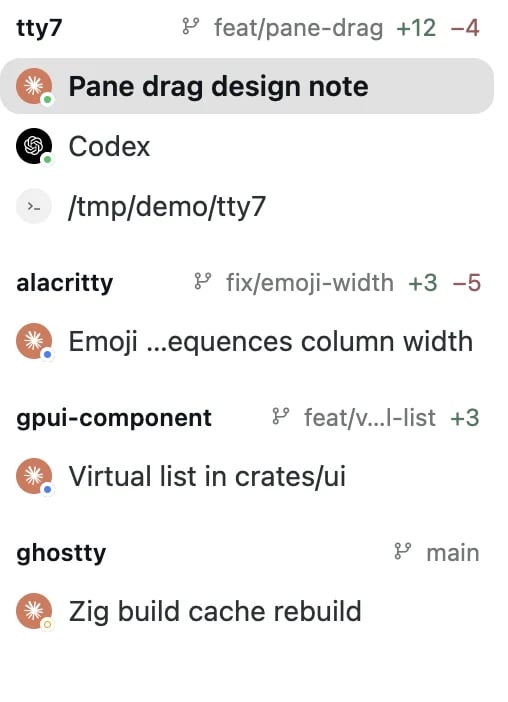
Working (blue), waiting on you (amber), and done (green), side by side
tty7 agents reports as working / waiting /
done, and what tty7 wait blocks on. A fourth state,
idle, carries no dot — it is an agent that has not started a turn.
Notifications
Two, both following your Settings → General → Notifications policy:- “needs your permission…” the moment an agent blocks on you
- “finished after 42s” at the end of a turn
notify;title;body) or kitty’s OSC 99. tty7 shows it under the same policy,
held back only while you are looking at that pane, and a click reveals the
pane. Claude Code writes one when its Notifications setting (/config) is
ghostty, kitty or iterm2. Its default, auto, sends nothing in tty7. A
pane whose agent already reports through tty7’s hooks skips the copy that would
repeat the notice above.
The tray icon
tty7 keeps a status item in the system tray (menu bar on macOS). It flips to an attention state the moment any agent anywhere needs input, so you can see it without the window in front of you. Its menu lists every agent pane with its brand avatar and status dot — click one to reveal it — and also holds the notification policy switch and Quit and Stop Server…. Turn it off with Settings → General → Show tray icon (show_tray_icon: false).
Sending an agent some context
Two Search Everywhere actions hand what is in front of you to the agent running in the pane, as a ready-made prompt:
If nothing recognisable is running, tty7 says “No running coding agent found”
rather than typing into your shell.