> ## Documentation Index
> Fetch the complete documentation index at: https://tty7.io/llms.txt
> Use this file to discover all available pages before exploring further.
# tty7
> A terminal workbench: persistent sessions, remote work, agents.
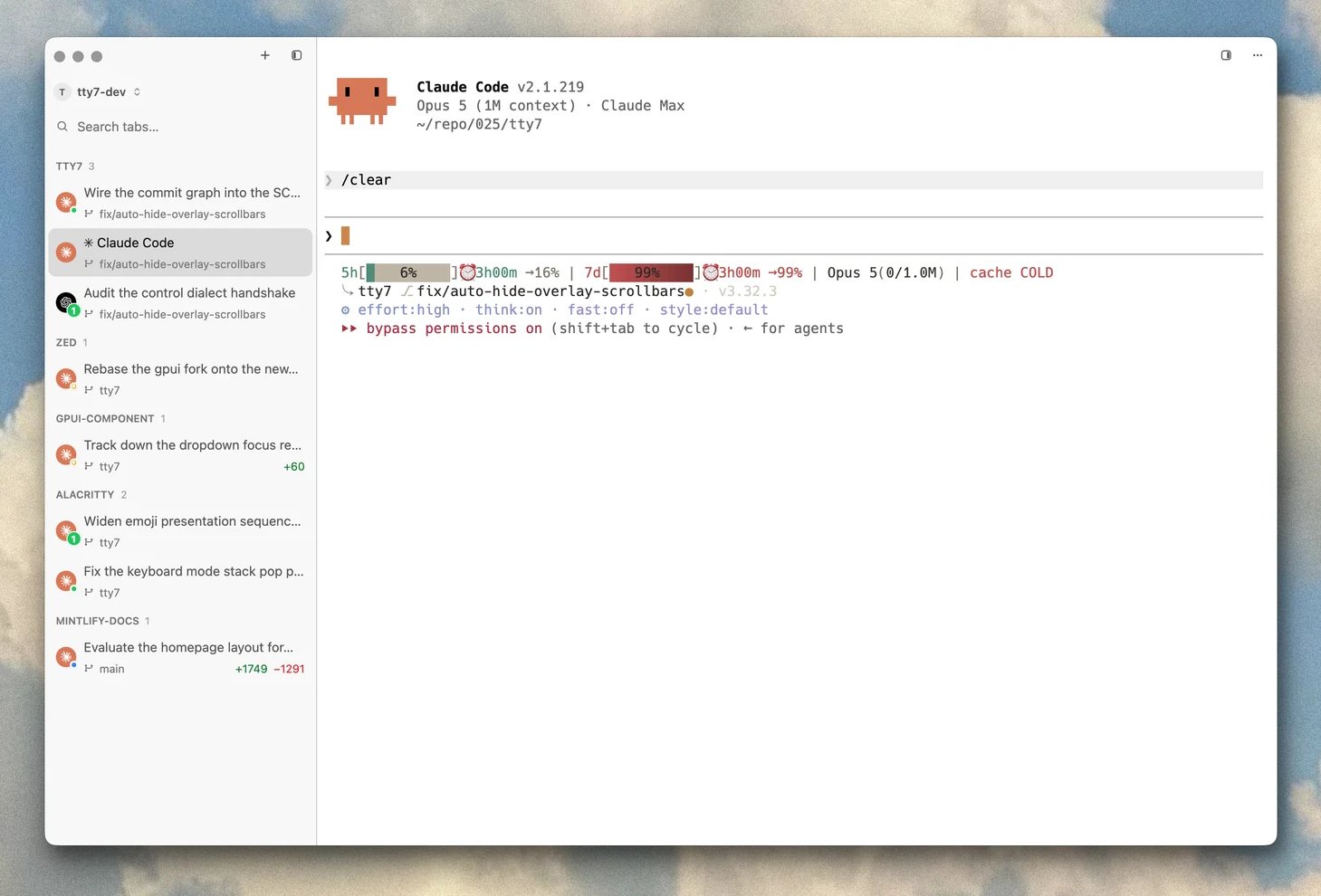 tty7 is a terminal you can leave running. Close the window, reboot the machine,
walk to a different laptop — the shells you started are still there, and so are
the coding agents you left working in them.
It is written in Rust, renders on the GPU through Zed's
[gpui](https://github.com/zed-industries/zed), and parses VT with Alacritty's
terminal core. In practice that means roughly twice the throughput of Alacritty,
Ghostty, or Kitty on a big `cat`, and a frame rate that does not fall over when
something floods the screen.
## What makes it different
A background server owns your shells, not the window. Quit tty7 and your
builds keep building. No tmux to learn or configure.
Ghost suggestions from your history, tab completion that explains each flag,
syntax highlighting, click-to-place-caret, real multi-line editing.
22 coding CLIs are recognised on sight. Per-pane status dots, notifications
when one needs you, git context, and session resume after a reboot.
A native Rust SSH stack with profiles, SFTP, and port forwarding — plus
remote workspaces where files, repos, and panes all stay on the far machine.
Branch and diff counts on every sidebar row, a source control panel, a diff
overlay, and worktrees in one dialog.
A bundled `tty7` CLI that opens panes, sends keys, reads screens, and blocks
until an agent needs you — so scripts and agents can drive the workbench.
## Start here
Native builds for macOS, Windows, and Linux.
[Installation →](/getting-started/installation)
Five minutes of settings that pay for themselves.
[First launch →](/getting-started/first-launch)
Workspace, tab, pane — and the server underneath them.
[Core concepts →](/getting-started/concepts)
## How fast, exactly
Same machine, same day, same 155×40 grid — Apple M1 Pro, macOS 26.3.1,
five-run averages.
| | **tty7** | Alacritty | Ghostty | Kitty |
| ------------------------------------------------------------------------------------------------- | ------------------: | --------: | ------: | ------: |
| Plaintext I/O — 11 MB `cat` (lower is better) | **95 ms** | 239 ms | 179 ms | 185 ms |
| [DOOM-fire](https://github.com/const-void/DOOM-fire-zig) frame rate (higher is better) | **888 fps** | 485 fps | 552 fps | 617 fps |
| Cold-launch memory | 116 MB 1 | 105 MB | 128 MB | 130 MB |
1 GUI 105 MB plus the persistent server at 11 MB.
The methodology and a one-command reproduction live in
[`scripts/bench/`](https://github.com/l0ng-ai/tty7/tree/main/scripts/bench).
Three decisions account for most of it:
* **The PTY is read at device speed** and parsed in large batches, off the
render path — so drawing never throttles reading.
* **The hot paths are lock-free.** A big `cat` never waits on the renderer.
* **The server buffers up to 16 MiB** ahead of the window before backpressure
applies, which is enough that a flood finishes writing while the window is
still catching up.
## Getting help
Ask a question, show what you built.
Bugs and feature requests.
Everything that shipped, release by release.
tty7 is a terminal you can leave running. Close the window, reboot the machine,
walk to a different laptop — the shells you started are still there, and so are
the coding agents you left working in them.
It is written in Rust, renders on the GPU through Zed's
[gpui](https://github.com/zed-industries/zed), and parses VT with Alacritty's
terminal core. In practice that means roughly twice the throughput of Alacritty,
Ghostty, or Kitty on a big `cat`, and a frame rate that does not fall over when
something floods the screen.
## What makes it different
A background server owns your shells, not the window. Quit tty7 and your
builds keep building. No tmux to learn or configure.
Ghost suggestions from your history, tab completion that explains each flag,
syntax highlighting, click-to-place-caret, real multi-line editing.
22 coding CLIs are recognised on sight. Per-pane status dots, notifications
when one needs you, git context, and session resume after a reboot.
A native Rust SSH stack with profiles, SFTP, and port forwarding — plus
remote workspaces where files, repos, and panes all stay on the far machine.
Branch and diff counts on every sidebar row, a source control panel, a diff
overlay, and worktrees in one dialog.
A bundled `tty7` CLI that opens panes, sends keys, reads screens, and blocks
until an agent needs you — so scripts and agents can drive the workbench.
## Start here
Native builds for macOS, Windows, and Linux.
[Installation →](/getting-started/installation)
Five minutes of settings that pay for themselves.
[First launch →](/getting-started/first-launch)
Workspace, tab, pane — and the server underneath them.
[Core concepts →](/getting-started/concepts)
## How fast, exactly
Same machine, same day, same 155×40 grid — Apple M1 Pro, macOS 26.3.1,
five-run averages.
| | **tty7** | Alacritty | Ghostty | Kitty |
| ------------------------------------------------------------------------------------------------- | ------------------: | --------: | ------: | ------: |
| Plaintext I/O — 11 MB `cat` (lower is better) | **95 ms** | 239 ms | 179 ms | 185 ms |
| [DOOM-fire](https://github.com/const-void/DOOM-fire-zig) frame rate (higher is better) | **888 fps** | 485 fps | 552 fps | 617 fps |
| Cold-launch memory | 116 MB 1 | 105 MB | 128 MB | 130 MB |
1 GUI 105 MB plus the persistent server at 11 MB.
The methodology and a one-command reproduction live in
[`scripts/bench/`](https://github.com/l0ng-ai/tty7/tree/main/scripts/bench).
Three decisions account for most of it:
* **The PTY is read at device speed** and parsed in large batches, off the
render path — so drawing never throttles reading.
* **The hot paths are lock-free.** A big `cat` never waits on the renderer.
* **The server buffers up to 16 MiB** ahead of the window before backpressure
applies, which is enough that a flood finishes writing while the window is
still catching up.
## Getting help
Ask a question, show what you built.
Bugs and feature requests.
Everything that shipped, release by release.